
Table of Contents
5 Best Sales Engagement Platforms for B2B Teams

The best sales engagement platform should make a rep’s next action clear and preserve what happened in the CRM. An email sequence is one part of that job. The buying decision also includes task ownership, replies, activity logging, duplicate records and the work a manager can inspect.
This comparison evaluates Outreach, Salesloft, Apollo, Reply and lemlist for rep-led B2B outreach. Consider Outreach and Salesloft when an established revenue organization needs a governed engagement process. Evaluate Apollo when prospect data and rep activity should stay close together, Reply when multichannel sequencing and mapped CRM workflows fit the requirement, or lemlist when personalized outbound across several channels is central. These are documented requirements to assess, without a measured ranking of productivity or meetings booked.
The research uses official product, support, integration and pricing sources reviewed from 29 October through 5 November 2026. No customer records were uploaded and no campaign, CRM connection or shared product benchmark was run for this comparison. Prices describe public configurations; confirm the selected plan, term and included activities when comparing a quote.
Sales engagement versus CRM and AI SDR software
A CRM holds customer and pipeline records. A sales engagement platform organizes the work reps do with those records: sequences, manual tasks, calls, replies and follow-up. An AI SDR product may own more of prospect sourcing and reply handling, depending on its configuration. Do not use an AI agent’s starting price as the price of a rep’s engagement seat. For those broader agent responsibilities, compare the AI SDR tools guide by sourcing, approval and reply ownership.
Use our sales automation overview for the broader CRM and workflow decision. For an adjacent rep workflow, see our La Growth Machine review and verify its current configuration alongside your shortlist. If the requirement is mainly email sending, use the narrower cold email software comparison.
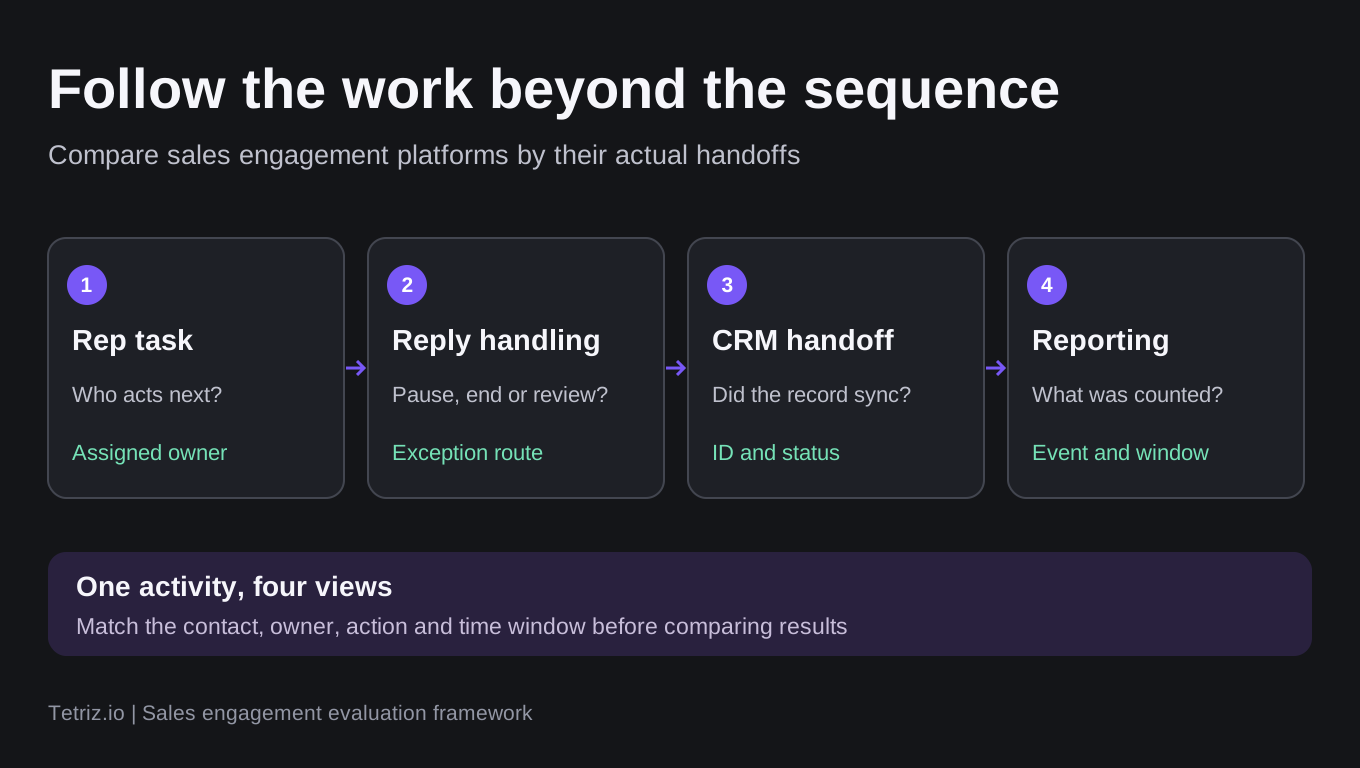
Trace the same activity across the sequence, inbox, CRM and report. This is a proposed evaluation framework rather than a tested product result.
Compare the rep workflow
The table scrolls horizontally on smaller screens.
| Platform | Requirement to evaluate | Buying check | Handoff detail to inspect |
|---|---|---|---|
| Outreach | Standardized rep engagement and revenue workflows | Quoted seats, package and AI credits | CRM records, task ownership and activity definitions |
| Salesloft | Cadences around an established CRM process | Current package and integration scope | Data Sync connection, merge/deletion settings and logs |
| Apollo | Prospect data plus rep outreach in one workspace | Plan level, pooled credits and dialer access | Automatic email versus assigned manual tasks |
| Reply | Rep-led multichannel sequences with mapped CRM data | $89 annual equivalent or $99 monthly per user for Multichannel | Sync cycle, owner mapping and unsupported activity types |
| lemlist | Personalized campaigns across email and other channels | €87 annual equivalent or €109 monthly per user for Multichannel | Contact creation, field directions and activity logging |
The table describes evaluation requirements rather than claiming that every feature is included at the cheapest price. Request a configuration that matches your CRM, users, channels and reporting needs.
Outreach: assess the engagement package and AI usage together
Outreach’s sales engagement product belongs on the shortlist when the team needs a consistent prospecting and follow-up process across reps. Its wider platform also includes revenue and AI capabilities, so define which modules the purchase includes.
The current pricing model combines seat access with consumption-based AI credits. Pricing is quoted, and the public page identifies research, personalization, sequencing, conversation analysis and forecasting as AI-credit uses. A seat quote alone is therefore insufficient to estimate the configured team’s bill. The same pricing page lists multichannel sequences under Amplify Core, while Amplify Essentials emphasizes conversation intelligence and coaching. Have the proposal name the package and purchased engagement capabilities instead of inferring them from an entry-tier label. Its FAQ defines AI consumption in terms of discrete actions with predefined credit costs. Ask for the action definitions and credit allowance for the workflow you intend to run.
Ask the vendor to walk through an assigned rep task, an automatic email, an incoming reply and the corresponding CRM activity record. Clarify which outputs are included in the package and which agent actions consume credits. That walkthrough is a buyer check, not a test completed for this article.
Outreach’s sync-audit guide describes an export containing the lesser of 30 days or 10,000 errors, with record identifiers and timestamps. That is a concrete way to inspect failed handoffs rather than assuming a connected status proves all activity reached the CRM. Its duplicate-owner guide also documents a multi-user-assignment case where ownership sync can preserve multiple owners. Ask which ownership fields and mapping behavior apply to your CRM and configuration.
The Sequence Performance report guide defines total replies as first email replies from prospects. Its meeting attribution uses a defined sequence-related activity window and attributes only the first meeting per prospect within a 30-day window. Those definitions differ from counting every reply, every subsequent meeting or qualified opportunities. Check the attribution rules before reconciling a dashboard with CRM totals.
Best fit. Established revenue teams with an owner for engagement operations. Check carefully. Package scope, user types, AI consumption and the CRM records used for reporting.
Salesloft: evaluate the cadence and CRM lifecycle together
Salesloft’s engagement product focuses on cadences, rep work and coordinated follow-up. Its Salesforce integration listing describes bidirectional record sync and activity logging. Those capabilities still depend on the actual connection and field configuration. The current product page also describes AI account research and drafting within the rep workflow. That does not establish autonomous qualification or every adjacent agent entitlement in an engagement seat.
The current Salesforce Data Sync guide describes the External Client Application and separate integration-user and individual-user connections. A completed administrator connection does not by itself establish that each rep’s activity connection is working. The guide says field mappings and activity settings remain in Salesloft, while affected users must reauthenticate through the new connection.
The CRM mirroring guide distinguishes merging into one linked Salesloft person from merging several linked people. In the latter case, losing records leave active cadences, and their history does not move onto the master person’s record even though the activities remain available to analytics. Check that behavior alongside the deletion setting and sync logs.
No current numerical Salesloft quote has been verified for this comparison. Confirm the engagement package, required CRM access, implementation and seats in a written configuration. Separate product sign-ins or integration logos do not prove that every adjacent product is bundled.
Best fit. Teams that want cadence execution closely governed around their CRM. Check carefully. Rep connection status, merge/deletion behavior, package scope and activity definitions.
Apollo: separate automatic emails from work assigned to reps
Apollo combines prospect data and outreach execution. It is relevant when a team wants fewer transfers between list research and the rep’s next activity.
The task guide makes an important distinction: automatic email sends according to a sequence schedule, while manual email, phone, action-item and LinkedIn steps create work for an assignee. Contacts remain at manual steps until completion, skipping or a configured auto-skip window. A task labelled LinkedIn should not be presented as an automatically sent message.
The pricing FAQ describes Free, Basic, Professional and Custom plans, pooled credits and one plan level across an account. Numerical paid-plan cards were not verifiable in this research pass. Confirm the selected paid price, phone requirements, channel connections and CRM features rather than importing an older plan table.
Read our Apollo review for additional product context.
Best fit. Teams that want contact discovery and assigned outreach work in one workspace. Check carefully. Manual-step completion, dialer access, pooled credits and CRM sync entitlements.
Reply: check the rep-led plan and CRM mapping rules
Reply separates Sales Outreach pricing from Jason AI SDR and agency configurations. For this comparison, evaluate the rep-led Email Volume or Multichannel plan. The page shows different billing terms and channel allowances, so the selected view must accompany any numerical quote. The Multichannel card showed $89 per user per month on annual billing with 10 mailboxes per user, or $99 on monthly billing with five mailboxes per user. The detailed table also lists the $99 starting figure and five mailboxes. Confirm the mailbox allowance, contact capacity and channel entitlements in the quote for the billing term you choose.
Its CRM integration reference distinguishes cycle-based record sync from real-time events. Full record sync operates on a two-to-three-hour cycle, while Pipedrive triggers and webhooks can react to events in real time. Owner mapping determines how records are assigned and, for Pipedrive, whether a person can enter the mapped sequence.
The same documentation says LinkedIn activities do not sync to Pipedrive, converted Salesforce leads cannot be updated through that sync, and CRM triggers are not retroactive. Confirm that the activity type your managers need actually appears in the selected CRM. Do not describe a two-way integration as instant synchronization of every field and activity.
Best fit. Teams that want rep-led multichannel outreach connected to a CRM with defined mapping rules. Check carefully. Selected plan, contact allowance, channel accounts, ownership mapping and unsupported sync cases.
lemlist: compare Multichannel seats with email-only volume
lemlist’s pricing page separates volume-based Email from per-user Multichannel. The public selector showed €109 per user per month on monthly billing or €87 per user per month on annual billing, with five senders per user. The Multichannel card includes LinkedIn and calling and lists WhatsApp as an add-on. Confirm the SMS entitlement and price because the card lists SMS automation and the pricing FAQ describes SMS as an add-on. The volume-based Email selector showed €69 per month for 50,000 monthly emails with unlimited users.
The HubSpot integration guide distinguishes contact-creation triggers, field sync, user mapping and activity logging. Inspect those settings separately instead of assuming that connecting the CRM supplies the whole handoff. The field-mapping reference distinguishes bidirectional mapping from HubSpot-priority and lemlist-priority directions. It says mappings affect new data and future changes rather than automatically backfilling earlier imports. Allow for the documented synchronization delay and inspect the selected direction. The troubleshooting guide distinguishes Done, Awaiting and Aborted log states and names user-mapping and missing-record cases. Use the details of the actual event to verify a completed handoff.
The pause and resume guide distinguishes pausing a lead for review from ending the sequence. Reply automation can use either behavior, and a paused lead retains its position for later resumption. The guide also warns that a step already queued within minutes may still send before a pause takes effect. Evaluate the actual rule and timing rather than assuming every reply creates an immediate, permanent stop.
Our lemlist review covers further campaign context.
Best fit. Teams whose reps coordinate personalized email and additional outreach channels. Check carefully. Multichannel users, included sending identities, data usage and the actual CRM integration version.
Trace one reply through to the CRM
Use the same proposed workflow when evaluating finalists. This is an evaluation procedure, without a claim that it was executed in the products here.
- Choose an authorized sample and identify the CRM record and owner.
- Add the person to a sequence and distinguish automatic steps from assigned tasks.
- Check what happens if the owner is absent or a task becomes overdue.
- Send a permitted test reply and inspect sequence stopping, routing and the next task.
- Confirm the CRM activity type, date, outcome and responsible user.
- Check opt-out scope and duplicate handling before another sequence can enroll the person.
- Create a recoverable sync failure in an approved test environment and inspect the log and recovery path.
A useful handoff carries a record identifier, owner, activity, outcome and next action. An integration logo or a successful initial connection is insufficient proof of that result.
Compare reporting definitions and actual team costs
Agree on what counts as completed work before comparing dashboard numbers. A queued email, completed phone task, reply, booked meeting and qualified opportunity measure different events. Check whether reports use the same contact, account, rep and time window as the CRM.
For a comparable quote, specify users, CRM edition, channels, connected mailboxes, active contacts, data or AI credits, calling and onboarding. Include recurring infrastructure and required add-ons. Avoid combining an email-only account price, a multichannel rep seat and an autonomous agent contract into a single cheapest-tool ranking.
Example: price five rep seats on the same term
At the listed annual reference prices, five Reply Multichannel users produce a calculated $445 monthly equivalent, or $5,340 over a year. Five lemlist Multichannel users at €87 produce a €435 monthly equivalent, or €5,220 over a year. Both examples use the currency shown by the vendor and cover seats only. Ask for a quote that includes required data, calling, mailboxes, add-ons and taxes. For Outreach, Salesloft and Apollo, request the same five-user scope and term instead of filling missing current figures with estimates.
Choose the platform around the process you can operate
Shortlist the platforms that support the required task ownership and CRM handoff. Then compare the complete configuration and inspect an example of the record your team will use to manage follow-up. The useful outcome is a process that reps and managers can understand, maintain and measure consistently.
Frequently asked questions
Does sales engagement software replace a CRM?
It usually coordinates outreach around CRM records rather than replacing every pipeline, permission and revenue-reporting function. Define which system owns each record and field before enabling synchronization.
Are all sequence steps automatic?
No. Some steps send automatically, while others create work a rep must complete. Check the product’s documented behavior for each channel and the rules for overdue or skipped tasks.
How should a small team compare sales engagement costs?
Price the same users, channels, contact volume, CRM requirements and billing term. Count data, calling, infrastructure, AI usage and onboarding where the configuration requires them. A headline seat or account price is only one part of that comparison.