
Table of Contents
5 Best AI SDR Tools for B2B Lead Generation

The best AI SDR tools should make the division of work clear. Write down who selects prospects, approves product claims, sends messages, handles replies and decides whether a meeting is qualified. Buying an agent does not remove those decisions.
This comparison covers Reply Jason AI SDR, Artisan Ava, AiSDR Ami, 11x outbound and Salesforge Agent Frank. Start with Reply when separate sourcing and sending controls are central to the evaluation, Artisan when a managed business rollout with explicit sending controls fits the workflow, or AiSDR when a per-person prospecting unit is useful for budgeting. Consider 11x when managed outbound infrastructure belongs in the purchase, and Agent Frank when its agent and sending-stack configuration fits the operation. Those are documented buying distinctions, not a measured ranking of meeting rates.
The research uses official product, support and pricing sources reviewed from 27 October through 3 November 2026. No shared campaign test, customer-contact upload, autonomous sending trial or CRM modification was performed. Prices describe public reference configurations and unresolved differences between official pages, rather than an accepted quote for a customer account.
AI SDR, copilot or sequencer: identify the job first
A writing copilot helps a person produce a message. A sequencer schedules messages and rep tasks against rules. An AI SDR can take responsibility for more of the outbound loop, such as finding candidates, researching them, generating outreach, classifying replies and arranging a meeting. The exact boundary depends on the product and configuration.
Do not treat the word autonomous as proof that every part of that loop is implemented or appropriate for your team. An agent might source people automatically while holding generated messages for approval. It might send a campaign without review but need a person to handle an unusual reply. Assess those controls separately.
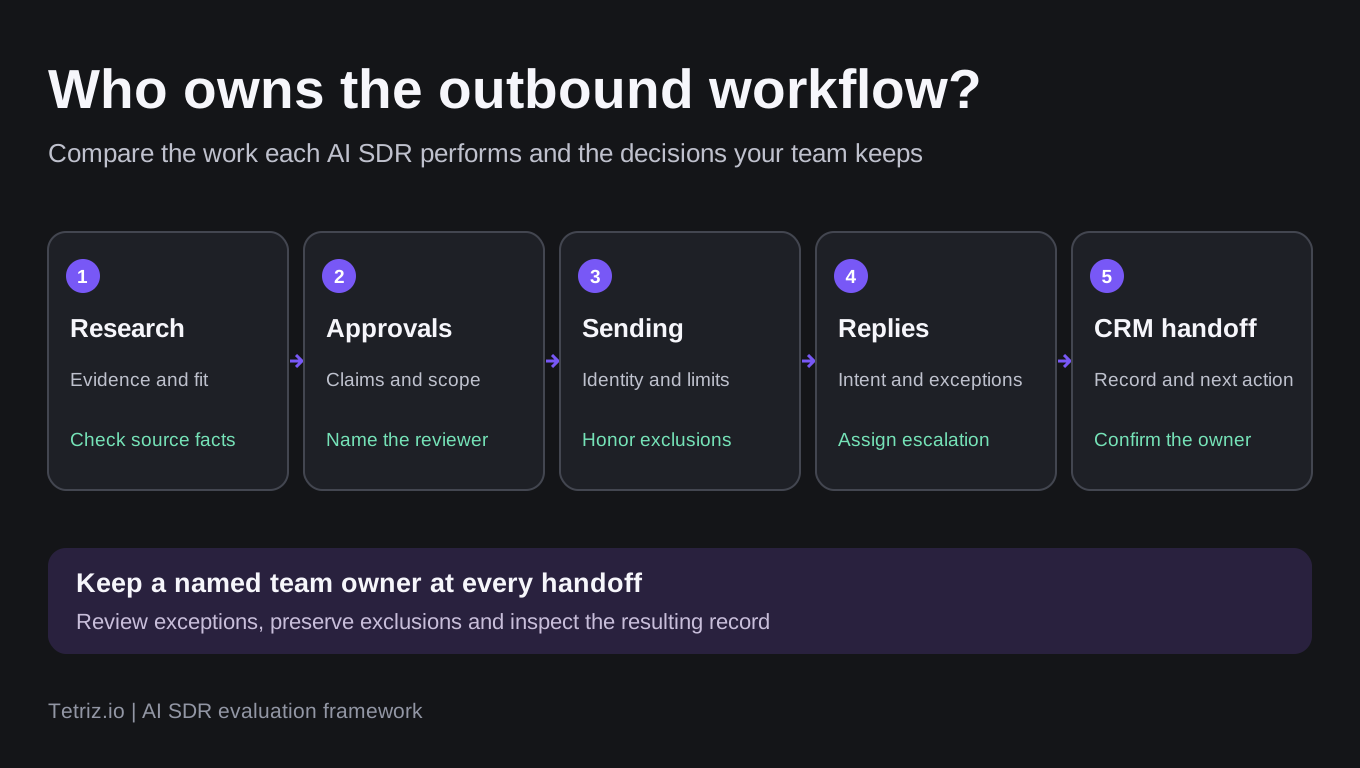
Use this evaluation framework to identify who owns each handoff. It describes a proposed operating model rather than a completed product test.
If the missing capability is primarily scheduling and managing email campaigns, use our cold email software comparison. Use the broader sales automation overview when the purchase also includes CRM and pipeline work.
Compare the operating model
Tables scroll horizontally on smaller screens.
| Product | Documented requirement to evaluate | Public price reference and buying unit |
|---|---|---|
| Reply Jason AI SDR | Sourcing, playbooks and generated outreach with review controls | Starter: $800 monthly or $500/month billed annually for 1,000 active contacts; check sourcing and channels |
| Artisan Ava | Managed business outbound with configurable sending and escalation rules | Custom business quote; Team describes about 2,500 contacted leads/month; confirm infrastructure and rollout |
| AiSDR Ami | Prospect research, campaigns and reply work within its outbound platform | $1.50 per person prospected with daily charging; confirm the billable-person definition and team terms |
| 11x outbound | An outbound agent with managed sending infrastructure | Growth card: $3,750/month billed annually for 2,000 new prospects/month; reconcile the conflicting FAQ quote |
| Salesforge Agent Frank | Prospecting and outreach with autonomous or review modes | Help: $599/month billed quarterly; annual hero: $499/month for a different capacity reference; infrastructure extra |
The table does not say that every listed feature belongs to the cheapest plan or runs without setup. Require a demonstration of the specific workflow you are buying. The useful comparison is which work the team can delegate while retaining an accountable owner.
Reply Jason AI SDR: separate sourcing from message approval
Reply’s AI SDR model guide separates sending autonomy from sourcing autonomy. The product can keep a sequence supplied with contacts while its approval mode holds generated messages for review. Automatic sending and automatic sourcing are therefore two decisions, rather than one universal switch.
The Jason AI SDR feature page describes editable messaging rules, playbooks and pre-send review. That makes Reply relevant to a team that wants to examine generated work before increasing autonomy. It does not demonstrate that an account already has the right claims, exclusions or qualification policy configured.
The selected base Starter view on Reply’s AI SDR pricing page showed 1,000 active contacts at $800 on monthly billing or a $500 monthly equivalent billed annually. Selected Growth showed 5,000 active contacts at $2,500 monthly or $1,500 per month billed annually. LinkedIn allowances differed between the billing views, so preserve the term when comparing a channel configuration. Temporary promotions are excluded from these references.
Reply’s limits reference defines an active contact as a person receiving an outreach step during a billing month. Follow-ups to someone already counted in that period do not consume another active-contact unit. Reaching the same person in a new billing month counts again, and the reset follows the subscription renewal date. The AI SDR sourcing allowance is a separate plan check shared across its sources. Stored contacts, people sourced and active contacts should not be treated as interchangeable quantities.
Reply’s knowledge-base reference documents separate reply-handler modes. Auto sends immediately; Draft holds a generated reply for a person; Stop & notify pauses further sending to that contact, flags the conversation and notifies the assigned rep without generating an AI response. Different question types can use different modes. When mixing Auto and Draft, the documented setting is Mixed. Use those controls to assess an explicit escalation policy rather than assuming every reply should receive an automatic answer.
Its CRM reference also distinguishes record sync on a two-to-three-hour cycle from real-time triggers and webhooks. Confirm the actual target CRM, mapped owner and supported activity type before relying on a handoff. The documentation excludes some activity paths, including LinkedIn activity sync to Pipedrive.
Consider Reply when the team wants to assess sourcing and sending controls independently. Check carefully the chosen AI SDR plan, active-contact accounting, sourcing allowance, mailbox/channel entitlements and the exact CRM handoff.
Artisan Ava: define the business rollout and sending controls
The current business view on Artisan’s pricing page scopes Team, Scale and Enterprise plans around a managed outbound rollout. Team describes approximately 2,500 leads contacted per month and Scale approximately 6,000, with custom pricing rather than a published dollar quote. Treat those as scoped planning references rather than a purchased allowance.
The business FAQ describes pre-send approval, tone and CTA controls, banned phrases, and escalation rules for human involvement. It also describes bidirectional Salesforce and HubSpot sync. Those are vendor-documented controls, without an account test of how an exception reaches the assigned person. Require the proposed rollout to demonstrate that path.
Artisan also exposes a separate Startups selector. Confirm whether a proposal covers that program or the managed business rollout, including current availability, sending infrastructure and implementation scope. Prices and entitlements from the two programs are not interchangeable.
Consider Artisan when a managed business outbound rollout and adjustable sending controls fit the requirement. Check carefully the plan scope, lead-volume definition, human escalation and which infrastructure and CRM work are included.
AiSDR Ami: keep the per-person unit separate from monthly references
AiSDR’s pricing page advertises $1.50 per person prospected, daily charging and a separate team buying path. That is a different unit from paying for a writing seat or a pool of stored contacts. Define what makes a person billable before using it to budget for a campaign.
The vendor’s linked plain-text pricing reference describes charging for people contacted that day, with research, lists and writing included. For example, its stated daily pace of 20 people at $1.50 produces a calculated $30 daily usage charge, before any separately purchased services. It lists two-way HubSpot sync under PAYG and Salesforce under team-plan additions. Check integration entitlements and additional mailbox or managed-service costs in the selected configuration.
The official Ami product page describes preparing a first campaign for review before launch. The same page also retains a $250 monthly starting reference that does not match the pricing page’s PAYG presentation. Do not combine those references into an invented monthly allowance. The pricing FAQ now offers monthly, quarterly and annual subscription paths alongside PAYG. Get the chosen contract, features and billable-person definition confirmed before relying on a total.
The product page says the first campaign stays in draft until approval and that suppression lists and sending limits carry forward. It also describes proactive actions after that initial approval. Initial campaign review therefore does not establish that every later action waits for permission. Check the ongoing mode and escalation policy separately; these are vendor descriptions rather than a tested guarantee.
This is an outbound platform purchase rather than a promise that the agent already understands the company’s positioning. Provide approved product facts, targeting requirements and reply ownership. Check how the selected CRM integration carries status and activity, rather than treating an integration logo as the handoff.
Consider AiSDR when a per-person prospecting model is relevant to the team’s operating requirements. Check carefully the current price configuration, the billable-person definition, team terms and which decisions remain subject to review.
11x outbound: price the agent and managed infrastructure together
11x distinguishes its outbound product from inbound agents and a human dialer. Keep that boundary when evaluating a proposal. An inbound response workflow does not establish the outbound targeting and approval controls your team needs.
The official Alice/outbound pricing page lists a Growth card at $3,750 per month billed annually, with up to five end users and 2,000 new prospects per month. That card includes managed Gmail infrastructure and bidirectional CRM sync. Its FAQ also states a $36,000 annual starting price, while the card implies $45,000 before other terms. Those official references are inconsistent, so treat the actual annual quote as unresolved rather than selecting the lower number.
The current outbound page describes escalating sensitive replies to the team and stopping active sequences after an unsubscribe while flagging the preference in the CRM. It also labels calls in that sequence as rep-led. Those are vendor-documented boundaries, not evidence that an automatic email agent makes every phone call or that an account’s escalation policy is already configured.
Managed infrastructure can change the comparison with an agent that expects a separate mailbox stack. It does not prove better inbox placement or more qualified meetings. Require the proposal to name the domains, mailboxes, channels, prospect allowance, implementation work and human escalation policy it includes.
Consider 11x when managed outbound infrastructure is part of the requirement. Check carefully the reconciled contract total, pre-send review, qualification policy and CRM ownership behavior for the actual outbound product.
Salesforge Agent Frank: reconcile capacity and contract terms
Agent Frank’s help article documents autonomous and co-pilot modes, with the latter allowing work to be reviewed. It currently states $599 per month billed quarterly. That should not be presented as a cancel-anytime monthly contract.
The annual view on Salesforge’s pricing page shows a $499 monthly hero reference for 2,000+ contacts, alongside a calculator for different active-contact tiers. The calculator and hero use different capacity configurations, so confirm the selected tier and term instead of combining them into one quote. The pricing page presents an agent add-on and lists email infrastructure separately. Its FAQ says Agent Frank can run alone inside Salesforge without running other human-led campaigns. That does not establish the complete subscription bill for every configuration. Confirm the required subscriptions, infrastructure and precise contact definition before calling a figure the complete cost.
The Agent Frank setup guide specifies review before sending in Co-Pilot mode. Its selectable goals include asking for a link click or exchanging meeting links. That is a different completion event from a qualified meeting actually taking place. Define the outcome your team will measure and inspect separately how unusual replies reach a person.
The review mode is useful to investigate when the team wants to retain approval over generated work. Check the escalation path for an unusual reply and how the chosen sending stack preserves exclusions. No approval or agent action was exercised in an account for this article.
Consider Agent Frank when its agent and sending-stack configuration fit the team’s outbound operation. Check carefully capacity, the quarterly or annual commitment, required subscriptions, infrastructure and the records available for reviewing its actions.
Use an evidence and handoff worksheet
Before comparing results, give every finalist the same proposed task. Use a small, authorized input and require the operator to trace a prospect from research to the final activity record. The following is a buyer procedure, not a test completed for this article.
- Record the source supporting each personalization fact and distinguish it from an inference.
- Supply approved product claims and flag missing information before messages are generated.
- Identify whether sourcing, sending and reply handling each require approval.
- Check the sending identity, exclusions and behavior after an unsubscribe or an unexpected reply.
- Define what makes a meeting qualified and which cases must go to a person.
- Inspect the resulting CRM identifier, owner, status, activity and failure log.
- Record the billable quantities and actual charges for that configured workflow.
A useful record contains the evidence URL, approved claim, reviewer, suppression state, reply owner, escalation reason and CRM result. Do not replace those fields with a single AI-generated confidence score. A plausible message can still use an unsupported fact or reach someone who should have been excluded.
Check the difference between a source fact and a sales inference
For an illustrative research task, suppose a company’s dated careers page lists an SDR vacancy. A usable evidence record identifies the exact vacancy, URL and retrieval date. It does not turn that fact into an unsupported assertion that the company has approved a software budget, plans to replace staff or urgently needs your product. Ask each finalist to show which words came from the source and which conclusions were inferred. Then inspect the proposed outreach before approval. This is a suggested evaluation example, not a completed test of the products above.
Use our AI lead generation overview for the wider sourcing category and lead generation problems guide when diagnosing the operational gap first.
Keep qualification concrete. For example, a proposed policy could require an account to match the target segment, a contact to hold an appropriate role and a person to approve a nonstandard commercial request. That is an illustrative policy to configure and verify, not an outcome attributed to any vendor here.
Compare workloads before comparing prices
A request to reach 1,000 people can mean different things across these products. Reply’s active-contact allowance counts reached people within a billing period, while its sourcing allowance is another quantity. Artisan’s current business plan is scoped around its rollout and approximate contacted-lead volume, while 11x’s displayed card uses new prospects per month. AiSDR presents a per-person prospecting price, and Agent Frank’s visible references vary by contact capacity and term.
Write down whether the same people will be reached again in a later billing period, which research and enrichment work is required and who supplies domains and mailboxes. Add required users, channel accounts, CRM access, implementation and the contract term. Only then compare proposals for the same task.
This research does not establish a cost per qualified meeting. That denominator requires actual, consistently qualified meetings from a real permitted deployment. Vendor case studies and a published subscription price do not supply that measurement for your audience.
Choose by the work the team can supervise
Choose the product whose documented controls match the task and whose configured output the team can inspect. Start with review for claims, sensitive replies and qualification exceptions, then change autonomy only when the recorded workflow supports it. Maintain a named owner for targeting and handoff even when the software handles routine execution.
Use our data enrichment comparison when the missing input is account or contact data. Use the email verification guide when deciding which addresses should enter an outreach workflow. An agent purchase should answer a clear operational gap across those parts of the stack.
Frequently asked questions
Can an AI SDR replace an SDR team?
It can take on documented parts of outbound work, but the division of responsibility depends on the product and configuration. Targeting strategy, approved claims, unusual replies and qualification policy still need an accountable owner. Assess an actual workflow rather than treating an autonomous label as a staffing result.
Is an AI SDR the same as cold email software?
The categories overlap, but a campaign tool can schedule outreach without owning research, reply interpretation or qualification. Check the stages the product actually performs and the points where a person must act.
Which AI SDR is cheapest?
There is no comparable price until the workload, billable unit, term, infrastructure and human access are specified. The public references here include active contacts, people prospected, new prospects, scoped business plans and different contract commitments. Resolve conflicting official price references before using them for a purchasing decision.
Did this comparison test autonomous campaigns?
No. It uses official documentation and public pricing-selector observations. The proposed evaluation procedure is provided for an authorized buyer test, without inventing product performance or personal experience for the author.