
Table of Contents
5 Best Email Verification Tools for B2B Outreach

The best email verification tools help a B2B team decide which addresses can move into its next campaign and which need another check. Compare Bouncer for a focused list/API workflow, ZeroBounce when a recurring verification bundle is useful, and NeverBounce when your application needs explicit result codes and bulk jobs. Emailable is worth evaluating for a documented CRM import/export process, while Hunter fits teams already combining email finding and verification.
Choose the workflow and result policy before choosing a credit package. A valid label does not guarantee inbox placement, a reply or a current relationship with the recipient.
This comparison uses official product, pricing and support sources reviewed on 20-27 October 2026. The recommendations follow documented workflow fit. We did not upload a shared contact sample or run a timed accuracy test, so there is no measured accuracy, bounce-rate or speed winner in this guide. Price examples identify the currency, billing term and credit system.
Best email verification tools by workflow
Tables scroll horizontally on smaller screens.
| Tool | Workflow to evaluate | Important buying check |
|---|---|---|
| Bouncer | Bulk cleanup and real-time/API checks | Status, reason and accept-all flags; base credit quantity |
| ZeroBounce | Verification with an optional recurring suite | PAYG versus ONE; account-specific credit expiry |
| NeverBounce | Single checks and asynchronous bulk jobs | Billable inputs, timeout and result-code handling |
| Emailable | List verification and CRM import/export | Refund timing and which result categories return to the CRM |
| Hunter | Verification alongside email finding | All-in-One credits versus Data Platform Verification credits |
These are different routes to the same operational decision: whether an address should enter an active sending list. They do not replace a campaign plan or sender-health investigation. Our SaaS email marketing guide covers the wider campaign context.
Understand valid, invalid, catch-all and unknown results
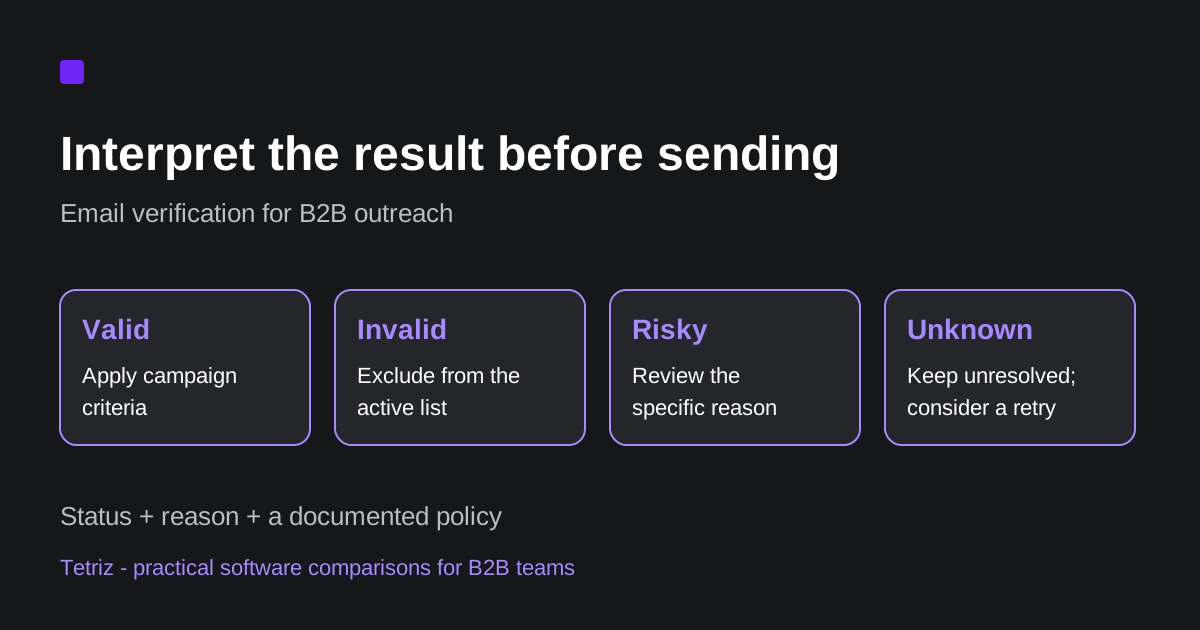
Read the result and its reason together. Bouncer’s terminology separates deliverable, undeliverable, risky and unknown states. NeverBounce’s result codes expose catchall separately, while Emailable’s state guide groups several uncertainty and quality reasons under Risky. Matching labels across vendors is not enough to establish matching evidence.
| Result family | What to investigate | A practical starting policy |
|---|---|---|
| Valid or deliverable | The verifier found positive mailbox evidence | Keep subject to your targeting and suppression rules |
| Invalid or undeliverable | Syntax, domain or mailbox failure | Exclude from the active sending list |
| Catch-all or accept-all | A domain-level acceptance setting limits mailbox confirmation | Keep in a separate review segment |
| Unknown | The verifier could not reach a confident conclusion | Retain the reason and consider a later retry |
| Other risky flags | Full mailbox, disposable address, role account or another documented reason | Apply a reason-specific rule |
This table is a proposed operating policy, not a universal mapping for every vendor. Check the specific reason and the evidence behind it. An unresolved result should remain distinguishable from an address confirmed invalid.
Also keep verification status separate from your own exclusions. An address that passes a technical check can still belong to the wrong person, fall outside your target market or appear on a suppression list.
Bouncer: focused bulk and API verification
Bouncer’s pricing page lists base pay-as-you-go quantities of 1,000 credits for $8 and 10,000 for $60. It states that purchased on-demand credits do not expire and that duplicates within a list and unknown results are not charged. Temporary bonus-credit promotions are excluded from the base-price examples here.
The useful distinction is in its API integration guidance. Real-time checks suit workflows where response time matters, while batch processing is designed for larger lists. The guide notes that long server connections and retries can create more unknown results in a time-constrained real-time workflow. That is a reason to compare the correct API mode, not a measured speed disadvantage.
Consider Bouncer when your priority is a focused verification step with explicit result fields. Check carefully how the returned status, reason and domain/account flags map into your CRM or sequencer. Its documentation presents those as separate fields, so retain them when they affect a later decision.
Bouncer can also return a didYouMean spelling suggestion. Its terminology guide says the suggested address has not been fully verified. Check the suggested address separately before treating it as usable, and keep the correction distinguishable from the original record.
ZeroBounce: compare a one-off cleanup with a recurring bundle
ZeroBounce’s billing FAQ describes one credit per validation and no charge for unknown results or duplicate removal. The published 10,000-credit PAYG rate is $0.0129 per credit, which calculates to $129.
Its ONE package lists $99 per month for 10,000 validation/scoring credits and additional services. The annual option is $79 per month equivalent, paid annually. Compare the recurring commitment with the work you actually need rather than counting every bundled feature as a benefit to your team.
Credit expiry needs more care than the broad headline. The detailed expiry FAQ distinguishes accounts created on or before 1 June 2026 from newer accounts. For newer accounts, purchased credits generally expire two years after the most recent purchase unless an active ONE subscription preserves them. After cancellation, the documented two-year period runs from the last subscription day.
Consider ZeroBounce when you want to compare verification as a recurring service with a one-off purchase. Check carefully your account’s expiry rule and whether credits will be used for validation, scoring or another service. The comparison here does not rank the product’s additional deliverability tools.
NeverBounce: explicit results and asynchronous bulk jobs
NeverBounce’s single-check reference returns valid, invalid, disposable, catchall and unknown codes. It also exposes flags such as role_account and accepts_all. The timeout setting controls how long the API tries before it can return an unknown result; total request time can exceed the setting because of network latency.
Its bulk-job reference describes creating a list job, checking progress and retrieving the finished results. The documented billable amount is the number of unique, syntactically valid input addresses. Credits are charged when full verification starts. That is an input-billing rule and should not be replaced with an assumption that only addresses labelled valid consume credits.
The job-status reference distinguishes a finished list from one still queued, running or under review. A failed job can reflect unreadable encoding, an empty file or a corrupt upload rather than an invalid verdict for every address. Make job completion and downloadable results part of the integration check before using the list.
Consider NeverBounce when your application needs a clear result-code contract and a bulk-job lifecycle. Check carefully how your integration handles a timeout, a job that is still processing and unresolved results. A current numeric purchase quote was not verified for this comparison, so confirm the required list-size price before comparing the bill.
Emailable: result categories matter when returning data to a CRM
Emailable’s pricing guide states that bulk, single, API and widget checks use one credit each. Credits spent on unknown results and duplicates are returned when the list finishes verification. The minimum credit purchase is 5,000, and credits do not expire.
With 10,000 credits selected, the checked EUR quote showed €60 PAYG or €51 per month on subscription. Use your actual checkout currency when comparing providers; these EUR figures are not USD equivalents.
The HubSpot integration guide provides a useful operational example. It documents importing a contact list, verifying it and exporting selected categories into a new HubSpot list. The preset named Maximum Reach includes Deliverable, Risky and Unknown results, while Maximum Deliverability includes Deliverable results. The preset names do not guarantee those outcomes. Choose the included states before returning the list to a campaign workflow.
The HubSpot integration FAQ says this dashboard workflow requires you to import and verify a list before exporting it. Connecting the integration does not automatically verify every newly captured contact. The page points to a widget or an additional automation for that separate requirement. Check the actual trigger and result mapping if your buying problem is continuous verification rather than an occasional list cleanup.
Consider Emailable when the export and CRM handoff are central to your verification process. Check carefully the final result mix, refund completion and whether an export creates a new list or changes existing records. Do not assume every integration applies the same write behavior.
Hunter: distinguish two credit systems
Hunter’s credit documentation distinguishes its All-in-One outreach plans from the API-focused Data Platform. Email Verifier and Bulk Email Verifier use 0.5 unified credit per verification on All-in-One plans. Data Platform uses one Verification credit per verification, with Search credits purchased separately.
That makes the required product configuration important. Ten thousand charged All-in-One checks use 5,000 unified credits. The same quantity uses 10,000 Verification credits under Data Platform. Do not compare the two pools as though the word credit means the same thing.
The same documentation says failed verifications use no credits. It also qualifies repeat-request behavior: the duplicate-request exemption does not apply to bulk uploads. Re-uploading a list should therefore not be assumed free because a single lookup was already performed.
With monthly billing selected, the pricing page showed Growth at €149 per month with 10,000 unified credits. That is one bundled configuration with capacity for the sample below, not a verified lowest-cost one-off quote. Monthly credits reset and do not roll over.
Consider Hunter when verification belongs beside email finding in an existing prospecting workflow. Check carefully which credit system your account uses and how much capacity remains after finding addresses. Our Apollo review provides context for the broader prospecting-platform decision.
Compare the cost of 10,000 checks under a stated configuration
Use the same input definition when budgeting: 10,000 unique addresses requiring verification, with duplicate and unknown billing handled under each vendor’s rules. The examples below do not assume every input produces a confident result.
| Configuration | Reference purchase | Important condition |
|---|---|---|
| Bouncer base PAYG tier | $60 for 10,000 credits | Base tier excludes temporary promotional bonus credits |
| ZeroBounce PAYG | Calculated $129 for 10,000 credits | 10,000 multiplied by $0.0129 |
| ZeroBounce ONE | $99/month for 10,000 validation/scoring credits | Recurring package; usage on other services can affect capacity |
| Emailable PAYG | €60 for 10,000 credits | Actual checked EUR configuration; unknown/duplicate credits refunded after completion |
| Hunter All-in-One Growth | €149/month for 10,000 unified credits | 10,000 charged checks use 5,000 credits; remaining credits share the monthly pool |
| NeverBounce | Current quote required | Confirm the billable list size and current price |
Dollar and euro quotes are shown separately and are not converted or ranked as a global cheapest option. A one-time credit pack and a subscription with unused capacity are also different purchases. If you already pay for a platform, compare the extra cost of the next list rather than assigning its entire subscription to verification.
For a worked example, suppose a verification run costs $60 and leaves 8,000 addresses that meet your stated campaign criteria. The calculated cost is $0.0075 per usable address. Dividing by 10,000 inputs would produce $0.006 per input, which answers a different question. These are illustrative values, not measured vendor results.
Evaluate speed, integration and usable outputs together
Before a trial, write down what should happen to each result. Use a small, permitted sample representative of your markets and list sources. Preserve the input count, unique-address count, verification time, final result mix and actual credit charge.
For processing time, record the workflow you used. A synchronous entry check and a batch job can have different timeout and retry behavior. Comparing one provider’s short-timeout API response with another provider’s completed bulk job would not establish a fair speed winner.
Use this worksheet to keep the evaluation repeatable:
- Input: list source, unique count, age and market segment.
- Configuration: bulk or real-time mode, timeout, retries and optional checks.
- Output: status, reason, confidence fields and unresolved records.
- Integration: export filters, field mapping, new-list behavior and suppression handling.
- Cost: purchased capacity, charged credits, refunds and unused balance.
- Outcome: usable addresses under your own policy, with sending results recorded separately if you later run an authorized campaign.
Keep a stable record identifier in your own evaluation log so an export can be matched back to the original list. Record the returned status and reason separately from your final include, review or exclude decision. That preserves why the team held an address back even if a later export uses a different label or a broader preset.
This is a proposed evaluation procedure, not a test performed for this article. The LinkedIn-to-email outreach guide covers the collection-to-campaign handoff. Keep source collection, verification and campaign execution distinguishable when diagnosing a poor result.
Which verification workflow fits your team?
Start with Bouncer or NeverBounce when a distinct bulk/API verification step is the main requirement. Compare ZeroBounce’s one-off and recurring options when the bundle and credit lifecycle matter. Evaluate Emailable when you need to control which result categories return to your CRM. Check Hunter’s existing credit allowance when finding and verification already happen in that workspace.
The useful choice is the one that produces interpretable results, fits the handoff and has a cost model your team can predict. Choose a result policy, compare the same sample and keep unknowns visible before moving a verified list into a campaign.
Frequently asked questions
Does a valid email result guarantee delivery?
No. Verification is evidence about an address at the time of the check. It does not guarantee a future mailbox response, inbox placement or recipient interest. Apply your own targeting, suppression and campaign rules after interpreting the result.
Should I delete every catch-all address?
A catch-all setting limits what a verifier can establish about an individual mailbox. Keep that result separate from a confirmed invalid address. Use a documented review or retry policy based on the reason and your campaign requirements, rather than automatically treating it as valid or discarding it without context.
Is an unknown result the same as an invalid address?
No. An unknown result can reflect a timeout, unavailable server or insufficient evidence. Retain its reason, keep it out of any automatic valid-only export and decide whether a later retry is useful. Check how your provider charges or refunds that unresolved check.
Which email verification tool is fastest or most accurate?
This comparison does not establish a speed or accuracy winner because no shared reference sample was tested. Compare the same permitted addresses, API mode, timeout, retries and final result policy. A vendor’s processing-time or accuracy claim is not an independent benchmark against every alternative.