
Table of Contents
5 Best Email Deliverability Tools for B2B Outreach

The best email deliverability tools answer a specific question about your sending setup or messages. For B2B outreach, start by deciding whether you need a placement test, authentication diagnosis, ongoing monitoring or a mailbox warm-up service. Those jobs produce different evidence.
Shortlist GlockApps for repeatable placement tests with diagnostic reporting, MailReach for placement testing alongside an optional warm-up subscription, and Warmup Inbox when evaluating mailbox warm-up plus its separate placement tool. Use MxToolbox to investigate sending configuration and monitoring, and Google Postmaster Tools as a complementary signal for personal Gmail traffic. These recommendations follow documented scope, without a measured ranking of inbox rates.
This comparison uses official product documentation and public pricing selectors reviewed between November 3 and November 10, 2026. No test messages, customer records, connected inboxes or warm-up campaigns were used for this article. Price references retain their selected billing term and quantity, and need a current configuration check before purchase.
Choose the deliverability job before the tool
An email address can be valid while a message to that address is filtered. Our email verification comparison covers the address-cleaning decision separately. If the requirement is sequencing and managing outreach, use the cold email software guide alongside this diagnostic comparison.
Deliverability software can help with several different jobs:
- Placement testing: Send a message to known seed inboxes and inspect where those copies land.
- Authentication and configuration: Inspect DNS, message authentication and the systems sending for your domain.
- Monitoring: Watch for changes in blocklists, authentication reports or provider signals over time.
- Warm-up: Run a separate stream of mailbox activity through a vendor’s network.
A placement result describes the sampled accounts, message and time. An authentication pass does not establish where every recipient will see a message. A warm-up-network result should also remain separate from real campaign performance. Evaluate the evidence behind a score before using that score to increase sending.
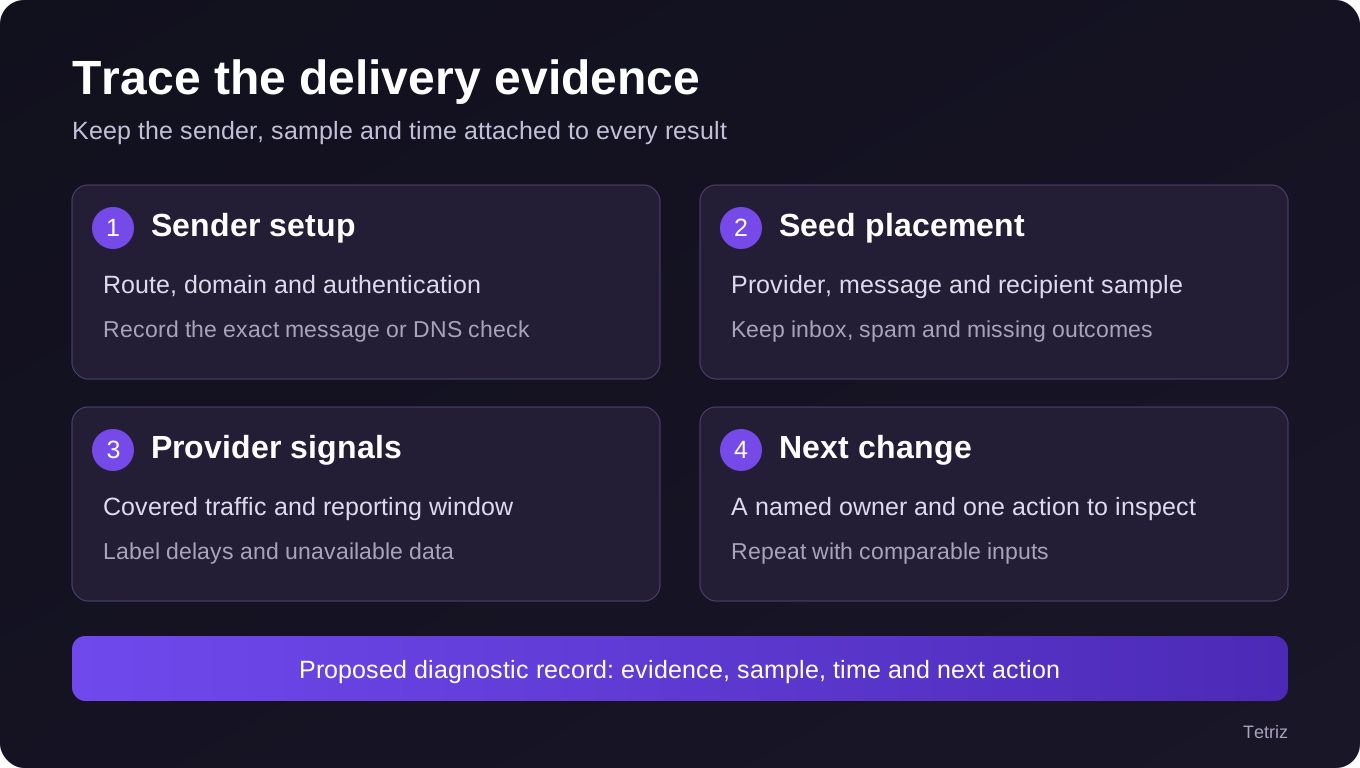
Use this as a diagnostic record, not a promise that every step produces a complete answer.
Compare the email deliverability tools by evidence and cost unit
The table scrolls horizontally on smaller screens.
| Tool | Evidence to evaluate | Public price reference and important limit |
|---|---|---|
| GlockApps | Seed-based placement reports and diagnostic monitoring | Essential $85/month with 30 test credits; compare the separate annual configuration |
| MailReach | Placement tests, checks and optional warm-up | Observed monthly All-In-One: $25 for one mailbox with 20 test credits; standalone test credits use a different configuration |
| Warmup Inbox | Warm-up monitoring and a separate free placement test | Basic $19/inbox/month monthly, or $15/month equivalent billed yearly for one inbox; the free test has its own scope |
| MxToolbox | DNS/authentication diagnostics, DMARC and sender/blocklist monitoring | Free lookup tools; Delivery Center public checkout lists a $129 minimum monthly charge |
| Google Postmaster Tools | Provider-specific dashboards for personal Gmail traffic | No paid seat quote; low-volume data can be absent and the data is delayed |
These are different purchases rather than interchangeable prices for one inbox-placement percentage. Confirm test frequency, mailboxes, sending sources and the period behind each allowance.
GlockApps: repeat placement tests with an explicit credit budget
GlockApps’ monthly bundle pricing lists Essential at $85 per month with 30 spam-test credits and 50,000 DMARC messages. The annual view instead shows a $59 monthly equivalent, $708 paid annually and a 360-test-credit reference. Keep that term and allowance together rather than describing the annual figure as a cancel-anytime monthly purchase.
The test-credit explanation counts a test against either a full or partial seed list as one credit. Automatic runs and proxy-address tests also consume credits. Budget for each run, not only the number of sender domains.
Its free-plan help distinguishes two one-time Inbox Insight tests from recurring monthly DMARC usage and a limited monitoring trial. Do not turn those initial tests into a monthly free allowance.
Consider it when you need scheduled or repeated placement evidence with a visible test budget. Check carefully provider coverage, credit delivery/reset rules, retained results and the monitoring functions in the chosen plan. The seed sample still differs from the recipient list you ultimately want to reach. GlockApps’ description of the seed list says the accounts use default filters and have no prior engagement with the sender. For a B2B test, ask which personal or business mailbox types the report samples. Customer domains can have custom filters and different engagement histories. In GlockApps’ report glossary, a tab such as Promotions is an inbox category, while missing means the message did not reach a test mailbox in the report. If two tools classify tabs differently, compare the placement counts for the same provider and report missing outcomes separately. For example, a report with seven primary inbox, two Promotions and one missing should retain all three counts when the test is shared.
MailReach: separate the placement test from mailbox warm-up
MailReach’s spam-test guide describes adding an identifier to a message and sending it to the supplied seed addresses. Its report includes placement and checks for authentication, links, blocklists and message structure. Automatic testing requires a provider supporting SMTP. Those are documented workflows, without a completed test in this comparison.
The monthly All-In-One selector on MailReach’s pricing page showed $25 for one warm-up mailbox with 20 test credits included. The same page separates standalone Spam Tester credits and PAYG options. One test credit represents one placement test and its report. Verify the selected quantity, currency, renewal and credit terms before comparing that purchase with a mailbox subscription. Temporary introductory promotions are excluded from the monthly reference here.
Consider it when repeatable placement tests and a separately understood warm-up workflow fit your operation. Check carefully the sending path, automatic-test eligibility, test frequency and which activities require a connected mailbox. A warm-up score and a placement report are different measurements.
Warmup Inbox: distinguish the subscription from its placement tool
The selected one-inbox Warmup Inbox pricing showed Basic at $19 on monthly billing. The annual view showed $15 per month with $180 billed yearly. Basic lists 75 warm-up messages per day, a capacity measure that does not describe tests per month or campaign recipients. Changing mailbox quantity also changes the quote.
The vendor separately offers a free placement test with no signup or card. Its documentation describes seed placement, authentication, blocklists and content checks, including Gmail, Outlook, Yahoo and iCloud coverage. That gives the free test a different buying and measurement scope from the warm-up subscription. No test was submitted for this article.
Consider it when you want to evaluate a mailbox warm-up service while keeping placement diagnostics separate. Check carefully the selected term, connected inbox count and which report comes from which tool. The pricing page’s revenue calculator is a vendor projection, not a measured result for your campaign.
MxToolbox: diagnose the systems sending for your domain
MxToolbox’s lookup tools provide a starting point for MX and infrastructure checks. Its Delivery Center describes DMARC analysis, SPF/DKIM configuration and monitoring of sending sources and their blocklist reputation. That is useful when the question is which systems are sending for a domain and whether their configuration is working as intended.
The Delivery Center plan comparison lists $129 per month for Delivery Center. The public checkout showed the same minimum monthly charge before applicable taxes. It describes an initial charge with a first-month refund condition, so its risk-free wording should not be read as a no-charge trial. No signup, payment or monitoring configuration was submitted here. Confirm actual domain, reporting and monitoring allowances in the selected plan.
Consider it when sender discovery, authentication and ongoing configuration monitoring are the missing evidence. Check carefully the precise monitoring scope and retained reports. Those signals complement a placement test; they do not establish placement in every buyer’s inbox.
Google Postmaster Tools: add a provider-specific view
Google’s Postmaster Tools dashboard documentation scopes its data to outgoing messages sent to personal Gmail accounts. It provides spam-rate, reputation, authentication and delivery-error information, subject to the individual dashboard’s requirements. It is not a cross-provider placement report.
Google says low sending volume can cause missing data for privacy reasons. Updates usually arrive within 24 hours but can take longer, and the dashboards use UTC. An empty report therefore should not be translated into zero complaints or a healthy sender.
Consider it when you want Google’s own available signals alongside other diagnostic evidence. Check carefully domain verification, the covered traffic and when the report last updated. For a B2B campaign, do not assume personal Gmail data represents every company’s receiving system.
Use a diagnostic record instead of one overall score
Keep the inputs stable when comparing tests. Record the sending domain and mailbox, the actual route used by the campaign tool, the message version, the recipient sample and the run time. If two tests change all of those inputs, a different score does not identify which change mattered.
For each run, capture these fields:
| Field | What to record |
|---|---|
| Sender and route | Domain, mailbox, sending platform and relevant infrastructure |
| Authentication | Observed results and the exact record or message checked |
| Sample | Seed providers and count, or the covered provider traffic |
| Outcome | Inbox, spam, promotions, missing or unavailable, as the tool reports it |
| Time | Run time, report time and any known reporting delay |
| Next action | One change to inspect, its owner and the date of the next comparable check |
Keep missing results visible. If a tool cannot observe a message or a provider supplies no data, do not silently count that outcome as inbox placement. Likewise, do not merge a configuration score, a warm-up-network score and a seed-placement percentage into a fabricated overall success rate.
Trace a seed result back to the sending route
Send one controlled sample through the same tool, domain and mailbox that will send the campaign. If a Gmail seed receives the message, use Gmail’s authentication check for that message. Record the sending identity and whether SPF and DKIM authenticate, then inspect DMARC alignment against the visible From domain using Google’s sender guidance.
Suppose the sample fails DMARC and the report also shows filtering at one provider. Fix the identified alignment or signing issue first, then repeat the test with the same content and comparable recipients. If authentication passes but filtering persists at one provider, record that separately and compare with that provider’s broader feedback where available. This is an example of how to investigate a result. A single seed message can verify the behavior of that sending route, while Google Postmaster Tools provides aggregate feedback for personal Gmail traffic that meets its coverage requirements. Postmaster reports use UTC, and Google may omit low-volume days. Line up the reporting dates before comparing them with your campaign log, and keep an absent dashboard reading separate from an observed zero.
Use our LinkedIn-to-email outreach guide when the diagnostic process sits inside a wider prospecting workflow. Our Woodpecker review provides adjacent sending-platform context, including why mailbox operations and diagnostic evidence need separate checks.
Budget for the testing schedule you actually need
Calculate tests separately from connected mailboxes. For an illustrative four-week schedule, three sender configurations tested with two message versions each week create 24 planned runs: three times two times four. That would leave six credits within a 30-test monthly allowance before reruns or additional automatic tests, assuming each planned run consumes one credit. On MailReach’s one-mailbox All-In-One example, 20 included credits would leave four of those 24 runs uncovered before any reruns. Price the additional placement allowance separately and check whether the same three sending configurations can use it. These are planned runs and arithmetic based on the stated allowances.
Changing the cadence to every day increases usage substantially. Write down who can schedule automatic runs, what triggers another run, and whether a failed attempt consumes a credit. Confirm refill, expiration, overage, annual commitment and reporting-retention terms for the selected product. Do not assume a price per warm-up inbox also covers unlimited independent placement tests.
The cheaper configuration is the one that supplies the evidence you need at the required cadence. A free manual diagnostic can be useful for an occasional setup question, while recurring reporting, alerts and multi-sender operations can justify a different subscription. Paying for more warm-up activity does not by itself answer a missing placement or authentication question.
Choose the next diagnostic action
For repeatable seed tests, compare the actual provider sample and test accounting in GlockApps and MailReach. For warm-up, evaluate Warmup Inbox’s mailbox configuration while keeping its separate test results distinct. For sender setup, use MxToolbox’s diagnostics and monitoring; add the available Google view for its covered traffic.
Define the question, collect the relevant evidence and choose one documented next action. Then compare the next observation against the same inputs and a stated time window. Our SaaS email marketing strategy guide covers the wider audience and campaign decisions that no diagnostic score can resolve on its own.
Frequently asked questions
Does email verification prove inbox placement?
No. Verification assesses an address or list before sending, while a placement test observes copies delivered to its recipient sample. Keep those outputs separate, and use the address-cleaning guide for verification decisions rather than treating a valid address as a promise that the message will reach the inbox.
Can a seed test predict every business mailbox?
A seed test reports on its own recipient sample, message and time. Your intended buyers can use different providers, gateways and account settings. Use repeated comparable observations and the actual sending operation’s available evidence, rather than treating one vendor score as a guarantee for every future recipient.
Should a warm-up result be reported as campaign performance?
Keep the warm-up network’s outcomes separate from the campaign audience. The people, messages and receiving accounts differ. When deciding whether an operational change helped, state which sample was measured, retain unavailable outcomes and compare like inputs over a stated window instead of combining unrelated scores.
Which email deliverability tool should a small B2B team buy first?
Start with the unanswered question. A configuration problem calls for setup diagnostics; suspected filtering calls for placement evidence. Choose the sample and test cadence before choosing a subscription, and price that configuration alongside required mailboxes and reporting. The five tools here provide different evidence rather than one universal best score.