
Table of Contents
Best Partner Relationship Management Software for B2B Teams

Partner relationship management software gives resellers and referral partners a place to do business with you. For a B2B team, the first purchase decision is how a partner applies, finds the right resources and registers an opportunity. The second is how the channel team routes that opportunity to the right owner and records the decision in its CRM.
Start with the kind of partner program you need to operate. Kiflo is a candidate when the program runs on HubSpot or Salesforce and needs to price a known number of active partners. Evaluate PartnerStack when recruiting and paying B2B SaaS partners are part of the purchase, alongside lead and deal registration. Impartner and Channeltivity are candidates when several regions, partner types or approval workflows need to share a portal.
For background on partner types and acquisition goals, see our lead generation guide. A customer referral program has different users and incentives from a reseller portal. If you mainly track subscription sales and pay commissions, use the SaaS affiliate software comparison to evaluate those workflows.
Compare the same partner opportunity across tools
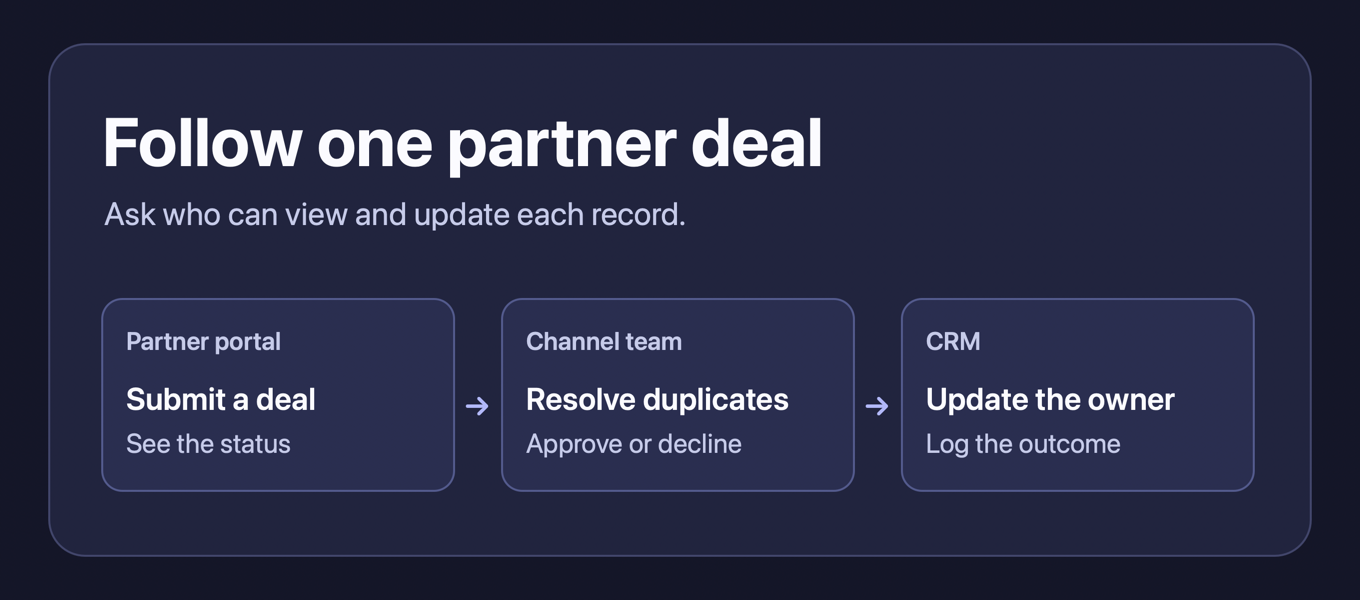
Give each vendor the same case. An approved reseller registers a deal that a second partner has already submitted. Ask who can see the conflict, who decides which partner owns the opportunity and what changes in the CRM. Then ask the vendor to show what each reseller sees once the opportunity is approved, rejected or reassigned. These are proposed buyer evaluations based on public vendor documentation.
The table scrolls horizontally on smaller screens.
| Platform | Program to evaluate | Public purchase reference |
|---|---|---|
| Kiflo | B2B SaaS program with HubSpot or Salesforce and a defined active-partner roster | Core displays $399/month and scales with active partners up to 50; confirm the annual quote |
| PartnerStack | SaaS program combining recruitment, onboarding and channel revenue | Launch requires a choice of link tracking or lead and deal registration; request a quote |
| Impartner | Structured multi-tier channel with portal, training and pipeline workflows | Request PRM pricing for the required modules and CRM integration |
| Channeltivity | Reseller or distributor program that needs several regional approval workflows | Tailored quote based on program structure and scale |
Kiflo for CRM-connected partner operations
Kiflo’s public pricing presents Core at $399 per month and lists up to 50 active partners and three partner managers. Its FAQ defines an active partner as an organization with at least one user who can access the portal. That changes the estimate for a company with many saved partners but only a subset with portal access. Kiflo says Core pricing scales with active partners. Its FAQ says Kiflo calculates commissions and generates payout paperwork, while your finance team makes the payment. Its FAQ describes a 12-month contract paid annually, so request the annual amount for your roster.
The Core listing includes a portal and lead registration along with HubSpot and Salesforce synchronization. Channel conflict detection appears under Plus. Kiflo’s onboarding documentation describes stages that can appear to a partner’s main contacts when they have tasks to complete. If conflict handling drives your decision, have the vendor demonstrate the quoted configuration before treating the Core price as the relevant benchmark.
The Kiflo HubSpot guide describes choosing whether to create CRM deals on submission or on acceptance. Kiflo documents that this workflow creates a new HubSpot deal by default and explains how to associate a registration with an existing deal by exposing the CRM deal ID in the form. Ask who can supply the ID and which system wins if the deal stage already differs. For Salesforce, Kiflo documents opportunity and contact mapping, API access and required permissions.
PartnerStack for SaaS partner recruitment and revenue operations
PartnerStack’s plan comparison describes a Launch choice between affiliate link tracking and lead and deal registration. If the program needs both, confirm the quoted plan because full access to all three appears under Enterprise. Growth lists structured learning and marketing development funds in addition to its Launch features. The partner deal registration guide illustrates what a partner submits and follows in the portal. PartnerStack’s group settings documentation describes custom forms and deal stages by group when that feature is included in the plan. Its resource documentation describes sharing resources with specific groups or segments. PartnerStack’s company deal submission guide describes two-way CRM sync when configured and says sending deals from the CRM to partners requires a custom integration. Ask the vendor to show the stages and permissions for a reseller group and a referral group and confirm the connector scope in the quote.
Impartner for a structured channel program
Impartner’s PRM materials describe partner onboarding, training, pipeline management and marketing development funds. Its lead management page describes routing and tracking partner opportunities. Use the PRM pricing page to confirm the modules, rollout costs and integration included in the quote. Impartner’s PRM product guide lists a separately purchased Journey Builder module that can include training, assets and registered deals in an onboarding journey. Ask for a report that shows how long approved partners take to register their first deal and which onboarding steps they leave unfinished. If you need those milestones, confirm the module in the quote and ask what a distributor, reseller and regional partner manager can each see.
Channeltivity for dealer and reseller workflows
Channeltivity pricing is tailored by program structure and scale. Its platform overview lists Salesforce, HubSpot and Dynamics 365 among its integration examples. Ask which connector, data fields, synchronization direction and approval logic are included for the CRM you operate. Channeltivity documents assigning portal and library access by group. It also documents configurable registration approval stages and deal expiration. Its Salesforce sync guide describes manual sync or automatic sync at creation, pre-approval or approval. Those options let you choose when your sales team first sees a partner submission in Salesforce. Its HubSpot setup guide describes automatic creation on registration and manual selection for pushing deals. Channeltivity also documents importing existing HubSpot deals after configuring the HubSpot sync fields. For a registration that already exists in HubSpot, the vendor’s linking guide describes linking it to the existing CRM record. Ask how the channel team finds that record before it creates a second opportunity. Use the duplicate-deal example to check who can see the submitting partner, the conflicting record and the final ownership decision.
Decide what the portal and CRM each own
Start with a partner contact who should see only their own organization’s submissions. Ask the vendor to show what a second user in the same organization can view and edit, and what an internal channel manager can override. Try giving the reseller access to a regional price list and withholding the same file from a referral partner. Move the reseller to another group and verify whether the old file link still opens.
Define what happens at submission, approval, expiration and close. Choose the system that can edit each stage, who owns the opportunity in the CRM and when you allow a new record to be created. If a second reseller submits the same account, test the duplicate rule against a named company and its subsidiary. Ask the channel manager to approve one request and decline the other, then compare the two portal views and the CRM record.
A partner-sourced deal starts with the partner, while a partner-influenced deal can begin in another channel. Agree on the rules before building a report. Check whether you can export the partner organization, external deal ID, owner, disposition, timestamps and outcome for both cases. That makes it possible to trace a number in the partner dashboard back to the CRM.
What to ask for in a PRM quote
List the active partner organizations, internal managers, portals, currencies and regions you need in the first year. Ask which plans include registration, CRM integration, training, marketing development funds, migration and onboarding. Separate recurring fees from implementation and confirm what happens when a partner exceeds its seat, organization or deal limits.
If your only job is attributing subscriptions and paying commissions, focus the evaluation on billing and payout rules. If partners need deal protection, assigned owners, shared sales materials and CRM updates, bring the sales operations team to the demo. A PRM purchase affects the partner’s portal and the CRM records the sales team uses every day.
Which PRM should your team shortlist?
Start with Kiflo if the buying decision turns on a defined active-partner limit and daily work in HubSpot or Salesforce. Consider PartnerStack if recruiting SaaS partners and managing partner payments belong in the same evaluation as registrations. Compare Impartner and Channeltivity when you need configurable portal access, approval and operations for multiple types of channel partner. In each demo, ask for the portal and CRM views of the same deal.
How we compared the platforms
This guide compares the vendors’ public pricing, product and support documentation. The buyer scenarios are proposed evaluations. Confirm plan access and the workflow with the vendor before purchase.